📞Creating a Guest Wi-Fi on OpenWRT that can only access WhatsApp🤙
Guide to configuring OpenWRT guest Wi-Fi for limited access to WhatsApp

Driving SD-WAN Adoption in South Africa
This is a article explains how to configure OpenWRT so that a guest WiFi can only access Whatsapp but it can be used generically to whitelist access from the guest Wi-Fi.
Make certain the /etc/resolv.conf has Quad9 as the name server:
search lan
nameserver 9.9.9.9
nameserver 1.1.1.2
We are using a dumb interface with no WAN interface. The WAN interfaces are deleted.
Create a bridge device named br-guest that is empty and make it for startup.
Create an interface named guest with the device br-guest. Associated the zone guest with this interface. Configure a static IP on the interface such as 192.168.254.254/24. Enable DHCP from 50 and allocation 200 IP addresses.
The firewall needs to look like this:
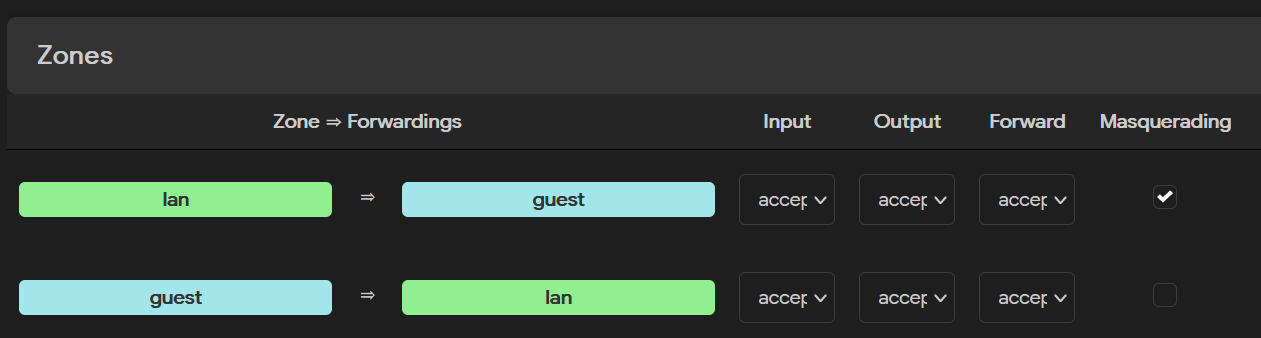
You can now add Wi-Fi SSIDs to the interface guest.
In the DNSMASQ configuration select ignore resolve file. DNSMASQ will now not resolve anything on the guest Wi-Fi.
You then add the whitelisted domains. In our case its whatsapp.
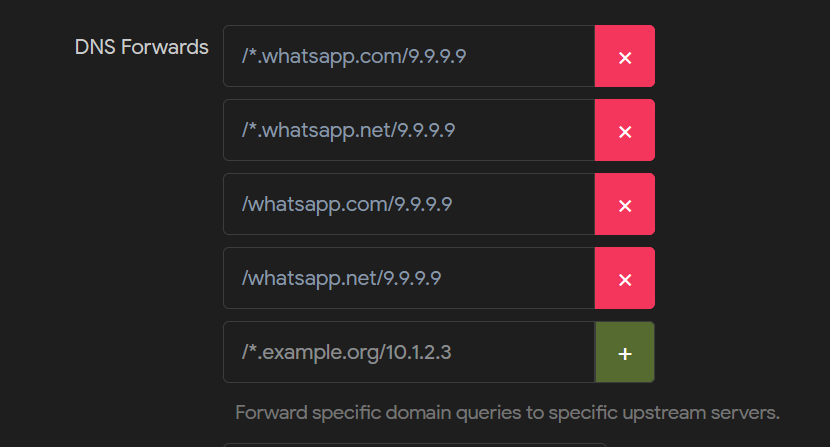
The guest Wi-Fi will now only work with Whatsapp!
Ronald Bartels ensures that Internet inhabiting things are connected reliably online at Fusion Broadband South Africa - the leading specialized SD-WAN provider in South Africa. Learn more about the best SD-WAN provider in the world! 👉 Contact Fusion


